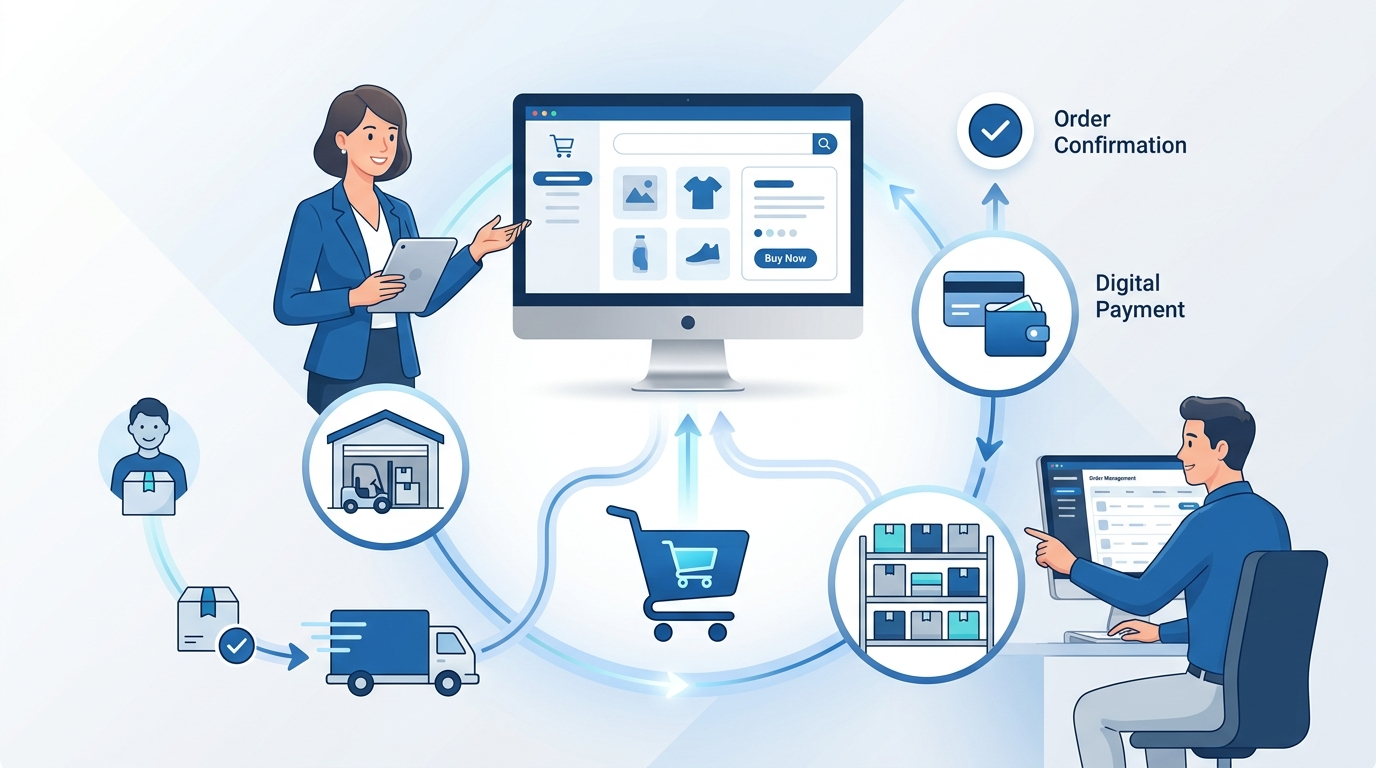

An e-commerce website is a digital ordering system that lets customers discover an offer, select products or services, provide transaction information and submit an order. Behind the visible pages, the site connects catalog data, pricing, inventory, checkout, payments, tax, fulfillment, customer accounts, security and support so the business can complete and manage the transaction.
An online storefront may look simple from the outside: a homepage, several product pages, a cart and a checkout. In practice, the website is the customer-facing layer of a larger operating system. A successful order may depend on several separate services exchanging accurate information within seconds.
For the broader definition of digitally ordered commerce, see our guide to e-commerce basics.
What Is an Online Commerce Site?
An online commerce site is designed to receive orders for goods or services through a digital network. The customer may pay online or later, and the product may be delivered physically, collected from a store or supplied digitally. The defining feature is the digital ordering function rather than the payment or delivery method.
This definition separates a transactional website from an informational business site. A restaurant page that only displays a menu is not necessarily an e-commerce site. If the same page allows customers to select items and submit an order, it becomes part of an e-commerce system.
The site may support consumers, businesses, one seller, multiple sellers, subscriptions, services or downloadable products.
Website, Platform, Marketplace and Online Store
These terms are related, but they do not mean exactly the same thing.
| Term | Meaning | Example Structure |
|---|---|---|
| E-commerce website | The customer-facing web experience used to place digital orders | Product pages, cart, checkout and account functions |
| E-commerce platform | The software and services used to operate digital commerce | Catalog, checkout, order management, integrations and administration |
| Online store | A digital retail operation, often operated by one merchant or brand | One seller controls products, prices and customer service |
| Marketplace | A system connecting buyers with multiple independent sellers | The platform may collect commissions or service fees |
| Commerce portal | A restricted or account-based ordering environment | B2B prices, approvals, contracts and purchase orders |
A business can use a platform to build its online storefront. A marketplace is one possible operating model for that website. An online store can also sell through a marketplace without owning the marketplace itself.
How Does an Online Store Website Work?
1. Product Discovery
The customer reaches the site through search, advertising, social media, direct navigation, email, a marketplace or an offline interaction. The landing page should match the customer’s intent and provide a clear path to relevant products.
2. Catalog Retrieval
The site retrieves product names, images, descriptions, variants, prices and availability. This information may come from the commerce platform, a product information system or several connected databases.
3. Product Evaluation
The shopper reviews specifications, delivery conditions, reviews, return rules and other evidence. Product comparison and filtering help the customer reduce a large catalog to a manageable choice.
4. Cart Creation
When the customer adds an item, the site creates or updates a cart. The cart records the product, variant, quantity, price and other conditions. It may also check whether the requested quantity remains available.
5. Checkout
The customer provides contact, delivery and billing information. The system calculates discounts, tax, shipping and the final payable amount. A good checkout reveals important costs before the final confirmation step.
6. Payment Authorization
The payment provider evaluates the transaction and requests authorization from the relevant payment network or financial institution. Authorization does not always mean the money has been finally captured, so the order system must understand the payment state.
7. Order Creation
The commerce system creates a unique order record. The order normally includes products, quantities, customer information, payment state, fulfillment method and transaction identifiers.
8. Inventory Reservation
The system reserves or reduces stock so the same unit is not promised to another customer. Stores with multiple warehouses or branches may use an order management system to choose the best fulfillment location.
9. Fulfillment
The warehouse, supplier, store or digital delivery system receives the order. Physical products are picked, packed and shipped. Digital products may be released through an account, license or download process.
10. Post-Purchase Service
The customer receives confirmation, tracking and support. The business must also manage cancellations, failed delivery, returns, exchanges and refunds. The website remains part of the transaction after checkout.
The Core Components
| Component | Primary Function | Failure Example |
|---|---|---|
| Product catalog | Stores product content, variants and attributes | Wrong dimensions or missing options |
| Search and navigation | Helps customers find relevant products | Products exist but cannot be discovered |
| Pricing engine | Applies price, discounts and customer rules | Product page and checkout show different totals |
| Cart | Maintains selected items before purchase | Quantity or price changes unexpectedly |
| Checkout | Collects transaction and fulfillment information | Customers cannot complete the final step |
| Payment integration | Authorizes and captures payment | Duplicate charge or incorrect payment state |
| Inventory system | Tracks and reserves available stock | The site sells an unavailable item |
| Order management | Coordinates status and fulfillment routing | The warehouse never receives the order |
| Customer account | Stores identity, orders and preferences | Orders appear under the wrong account |
| Analytics | Measures behavior and commercial outcomes | Reported purchases do not match order records |
Essential Online Store Features
Clear Product Organization
Products should be organized according to how customers shop. Categories, subcategories, filters and search must use understandable language rather than internal supplier or warehouse codes.
Complete Product Pages
A useful product page explains what the product is, who it suits, what is included and which limitations apply. Important information may include dimensions, materials, compatibility, variants, price, availability, delivery and returns.
Accurate Search and Filters
Search should handle common spelling, synonyms and product attributes. Filters should narrow the catalog without creating contradictory or empty results. The business must maintain consistent attribute data for these tools to work.
Persistent Shopping Cart
The cart should retain the customer’s selections long enough to support a normal decision process. It should show product, quantity, price, discount and estimated total clearly.
Transparent Checkout
Checkout should minimize unnecessary fields and explain delivery, tax, fees and return conditions before the order is submitted. Guest checkout is often useful when account creation is not essential to the transaction.
Appropriate Payment Options
The site should support payment methods used by the intended customers and markets. More methods are not always better; each integration introduces cost, support and fraud considerations.
Order Confirmation and Tracking
The customer should receive a unique order reference, summary and next steps. Tracking information should reflect actual fulfillment rather than only the creation of a shipping label.
Customer Service Access
Contact information and support routes should be easy to find. Customers need clear help for payment problems, delivery, returns, product questions and account issues.
Mobile Usability
The mobile version should support the same essential product information and transaction functions as the desktop site. Buttons, fields, navigation and error messages must remain usable on smaller screens.
Accessibility
An accessible website supports customers who use keyboards, screen readers, magnification and other assistive technologies. Current WCAG guidance organizes accessibility around perceivable, operable, understandable and robust content. Accessibility should be included in templates and testing rather than added only after complaints.
Search Visibility
Important categories and products need crawlable links. Search guidance for commerce sites recommends a navigation path from menus to categories, subcategories and product pages so crawlers can discover the catalog and understand relative importance.
Security and Privacy Controls
The website should use secure connections, controlled administrator access, maintained software and an appropriate payment design. Outsourcing payment processing can reduce exposure, but the merchant still needs to protect its website, accounts, scripts and third-party integrations.
Five Common Types of Online Commerce Sites
1. Single-Brand Direct Store
A manufacturer or brand sells its own products through a site it controls. The website emphasizes brand presentation, product education, customer relationships and direct fulfillment.
Example: A skincare company sells its own product line, offers bundles and manages subscriptions through one branded store.
2. Multi-Brand Online Retailer
The retailer buys or controls inventory from multiple brands and earns product margin. The site requires strong category design, comparison, inventory and merchandising.
Example: An outdoor retailer sells clothing, footwear and equipment from several manufacturers and fulfills orders from its warehouses.
3. Online Marketplace
Independent sellers list products or services while the platform supports discovery, payments, trust or fulfillment. The website must manage seller information and marketplace rules in addition to normal customer functions.
Example: A specialist marketplace connects customers with independent furniture makers and earns a commission from completed orders.
4. B2B Ordering Portal
A business portal may require login, approved accounts, negotiated prices, minimum quantities, purchase orders and credit terms. The customer journey is often longer and involves several employees.
Example: A restaurant supplier lets approved business customers reorder ingredients using contract pricing and scheduled delivery.
5. Subscription or Digital-Product Website
This type of site sells ongoing access, recurring delivery, software, media or downloadable products. Account management, renewals, failed payments and access control are central features.
Example: A research service sells monthly access to a digital library and manages user permissions through customer accounts.
Static Pages and Transactional Pages
| Page Type | Purpose |
|---|---|
| Homepage | Introduces the offer and routes customers to important sections |
| Category page | Organizes and compares a group of products |
| Product page | Supports evaluation and purchase of a specific product |
| Cart | Reviews selected products and totals |
| Checkout | Collects information and submits the order |
| Account page | Manages profile, orders, subscriptions and preferences |
| About page | Explains business identity and credibility |
| Contact page | Provides customer communication routes |
| Policy pages | Explain privacy, shipping, returns and transaction terms |
| Guides and FAQ | Answer questions before and after purchase |
Hosted, Self-Hosted and Custom Websites
Hosted Commerce
A hosted provider supplies the platform and manages much of the technical infrastructure. This can reduce setup and maintenance work but may create limits around customization, data structure, integrations or transaction fees.
Self-Hosted Commerce
The business runs commerce software in an environment it controls or manages through a hosting provider. This gives more technical flexibility but also creates responsibility for updates, security, backups and performance.
Custom Commerce
A custom system is built for specific workflows or scale. Custom development is justified when standard platforms cannot support a commercially important requirement. It also creates long-term maintenance, testing and staffing obligations.
| Approach | Best Fit | Main Risk |
|---|---|---|
| Hosted | Fast launch and standard retail processes | Platform dependency and feature limits |
| Self-hosted | Greater control with available technical management | Security and maintenance responsibility |
| Custom | Unique workflows, integrations or scale requirements | Cost, complexity and long-term ownership |
How to Plan an Online Store Website
1. Define the Customer and Offer
Identify who buys, what problem the product solves, how customers compare options and which information they require. The store structure should follow the buying process.
2. Choose the Operating Model
Document product ownership, inventory, fulfillment, revenue and customer-service responsibility. The website cannot be planned correctly when the underlying model is unclear.
3. Map the Order Journey
Write every stage from landing page to refund. Include normal events and exceptions such as payment failure, unavailable stock, partial shipment and cancellation.
4. Define Required Data
List the product attributes, prices, identifiers, stock states and customer information needed by each page and system. Assign a source of truth for every important field.
5. Select Technology
Evaluate platforms against the required process, integrations, data ownership, security, cost and migration options. Avoid buying features before confirming the workflow.
6. Build and Test Templates
Test real product, category, cart and checkout content rather than demonstration data. Include mobile, keyboard, error, payment, refund and performance testing.
7. Launch in Controlled Stages
Begin with limited products, traffic or geography. Verify that orders reach fulfillment, customers receive correct messages and reported revenue matches transaction records.
Our guide to start an online store covers demand validation, unit economics, suppliers and launch readiness in more detail.
Practical Example: A Small Home-Office Store
Consider a new store selling compact desks, monitor stands and cable-management products.
Catalog Structure
The store creates categories based on customer needs: compact desks, laptop stands, monitor stands and cable organization. Product attributes include dimensions, weight capacity, materials and assembly requirements.
Product Experience
Each product page shows measured dimensions, compatible devices, package contents and delivery conditions. Images demonstrate scale inside a small room rather than only showing isolated products.
Checkout and Payment
The checkout calculates shipping from product size and location. Customers can purchase without an account. The payment provider returns an authorization state before the platform confirms the order.
Fulfillment
Inventory is reserved after payment acceptance. Large desks and small accessories follow different shipping methods, so the customer sees possible split delivery before submitting the order.
Post-Purchase
The customer receives assembly guidance, tracking and a support route. Return eligibility reflects packaging condition and product size rather than using a generic rule for every item.
This example shows that website design follows operational reality. The checkout cannot promise one delivery when the fulfillment process requires two shipments.
Common Online Store Website Failures
| Failure | Warning Sign | Impact | Correction |
|---|---|---|---|
| Starting with design before process | Pages look complete but order states are undefined | Manual confusion and customer-service failures | Map the transaction and exceptions first |
| Using incomplete product data | Customers repeatedly ask basic specification questions | Low conversion and avoidable returns | Define required attributes by category |
| Showing recorded stock as available stock | Orders are cancelled after payment | Lost trust and refund workload | Use reservations and availability buffers |
| Adding too many third-party scripts | Pages slow down or change unexpectedly | Poor usability, security exposure and tracking conflicts | Audit script ownership and commercial value |
| Hiding total cost until the final step | Checkout abandonment rises after shipping appears | Wasted acquisition and customer frustration | Show delivery and fee expectations earlier |
| Ignoring accessibility | Keyboard or screen-reader users cannot complete checkout | Excluded customers and possible legal risk | Test templates against current accessibility guidance |
| Launching without refund testing | Support cannot complete a full or partial refund | Delayed resolution and accounting differences | Test payments, cancellations and refunds end to end |
| Creating unreachable product pages | Products exist only through internal search | Weak discovery by users and search engines | Use crawlable category and internal links |
What Makes a Good Online Store?
A good online store does not merely look professional. It reduces uncertainty, records orders accurately and keeps the commercial promise.
- clear product organization;
- accurate content and availability;
- transparent pricing and delivery;
- usable checkout on mobile and desktop;
- appropriate payment security;
- accessible navigation and forms;
- reliable order and refund processes;
- crawlable architecture;
- measurable customer and financial outcomes.
Visual design supports these qualities by directing attention and making choices understandable. It cannot compensate for unreliable inventory, unclear policies or a broken payment process.
How Search Engines Understand an Online Store
Search engines use links, page content and machine-readable data to interpret products and site structure. Important pages should be reachable through navigation links from the homepage to categories, subcategories and products.
Category and product URLs should be stable. Structured product data can describe price, availability, reviews, shipping and other attributes when that information matches the visible page.
Our guide to store SEO explains architecture, product pages, filter URLs, structured data and discontinued inventory in detail.
Frequently Asked Questions
What is an online commerce website?
An online commerce website is designed to receive digital orders for goods or services. It normally connects product discovery, cart, checkout, payment, inventory, order management, fulfillment and support. Payment or delivery may occur online or offline after the order is submitted.
How does an ecommerce website work?
The site retrieves product and availability data, records customer selections, calculates the order total, sends payment information to a payment provider, creates an order and passes it to fulfillment. It also communicates confirmation, tracking, cancellations, returns and refunds.
What are the main features of an ecommerce website?
The main features include product catalog, search, categories, filters, product pages, cart, checkout, payment integration, customer accounts, order tracking, inventory, support and policy pages. Mobile usability, accessibility, security and analytics are also essential operational features.
What is the difference between an ecommerce website and a marketplace?
An ecommerce website describes the digital ordering experience. A marketplace is a business model in which a platform connects buyers with multiple independent sellers. A marketplace uses an ecommerce website, but a single-brand store can also use one without operating a marketplace.
Can a small business build an e-commerce website?
Yes. A small business can use a hosted platform, self-hosted software or a limited marketplace presence. The best starting choice depends on product structure, payment markets, integrations, budget and technical capability. The business should validate demand and operations before buying excessive technology.
Does an e-commerce website need online payment?
No. The defining action is the digital order. A customer may order online and pay on collection, by invoice or through another accepted process. However, the website must communicate the payment method and order status clearly.
What pages should an online store include?
A basic store usually needs homepage, categories, product pages, cart, checkout, account or order-status pages, contact information and relevant privacy, shipping, return and transaction policies. Guides and FAQ pages can support product evaluation and post-purchase service.
How much does an ecommerce website cost?
Cost depends on platform fees, design, development, payment processing, applications, hosting, security, integrations and maintenance. A simple hosted store may have low setup cost, while custom product logic or enterprise integrations can require substantial long-term investment.
Final Summary
The website is the customer-facing part of a digital ordering and fulfillment system. It connects product information, cart, checkout, payments, inventory, orders and support so the business can receive and complete transactions.
The strongest websites are built from the operating process outward. They organize products according to customer needs, show accurate transaction information, support accessible and secure checkout and provide reliable post-purchase service.
Technology and visual design matter, but they are not the full business. A store becomes effective when the website, commercial model, product data and operational teams all follow the same customer promise.